
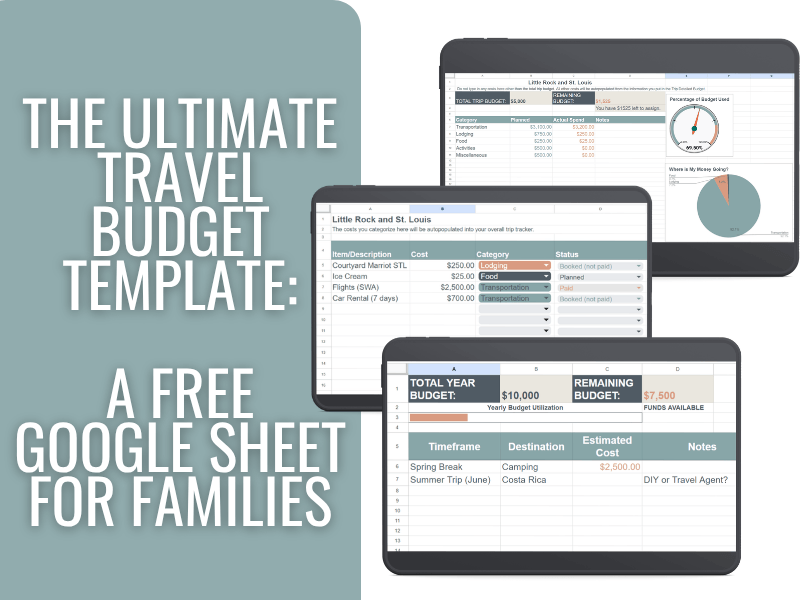
The Ultimate Travel Budget Template: A Free Google Sheet for Families
Planning a family trip can look affordable at first, until the final total tells a very different story. Between transportation, hotels, meals, activities, and all the little extras, travel costs can spiral fast without a clear plan.
That’s exactly why I created this travel budget template. This free Google Sheets budget tracker helps you plan a trip, map out your full vacation budget for the year, and track actual expenses while you travel. I built it after 11 years of planning trips for our family of five, and it’s designed to be simple enough to use in real life, not just pretty on a spreadsheet.
Why a Travel Budget Template Makes Trips Less Stressful
Most people do not overspend on travel because they never thought about a budget. They overspend because their budget lives in too many places: a few notes in their phone, rough mental math, saved screenshots, and a growing stack of booking confirmations.
That is where a premade template you can use over and over again makes such a big difference.
Instead of trying to piece everything together as you go, this template gives you one place to plan your trip budget, track your vacation budget, and see exactly where your money is going before and during the trip. It turns travel planning from reactive to intentional.
The reality is that travel costs add up fast. Flights, hotels, rental cars, meals, activities, and all the little extras can make a trip that at first felt affordable start to feel shockingly expensive once everything is booked. This travel budget spreadsheet helps you catch those costs early so you can make better decisions before you overspend.
And that matters more than ever. According to a NerdWallet travel survey, many Americans are still paying off debt from prior summer travel.
And my biggest piece of travel budget advice is do not go into debt for travel.
That is exactly why a simple travel budget tracker is so useful: it helps you see the full picture so you’re not coming home to a surprise on your credit card bill.
With a travel budget template, you can:
- Plan with clarity: See your expected costs before you book anything.
- Track spending in real time: Keep up with travel expenses while you are on the trip.
- Stay flexible: Adjust quickly if one category goes over budget.
- Reduce money stress: Enjoy the trip without constantly wondering if you are overspending.
- Build better habits for future travel: Use each trip as a smarter baseline for the next one.
A good budget template does more than organize numbers. It gives you a repeatable system you can use for a weekend getaway, a big family vacation, or your entire year of travel planning.
GET YOUR FREE BUDGET SPREADSHEET HERE
What Makes This Travel Budget Spreadsheet Different
I’ll be honest: My husband is a total spreadsheet wizard. For years, I watched him work his magic on our retirement and savings, and I decided I wanted to create something that was both “wizard-level” in its data but “busy-mom-level” in its simplicity. And travel-related (of course).
I was so proud to share this template with him. I needed a plan that was clear, visual, and simple enough to update while away from home.
This tracker is built on three pillars:
- Simplicity: No complex formulas for you to write.
- Customizable: It works for a weekend camping trip or a month in Europe.
- Visual: Progress bars and “utilization gauges” tell you exactly where you stand at a glance.
How to Use This Free Travel Budget Template in Google Sheets
Step 1: The 5-Year Travel Vision
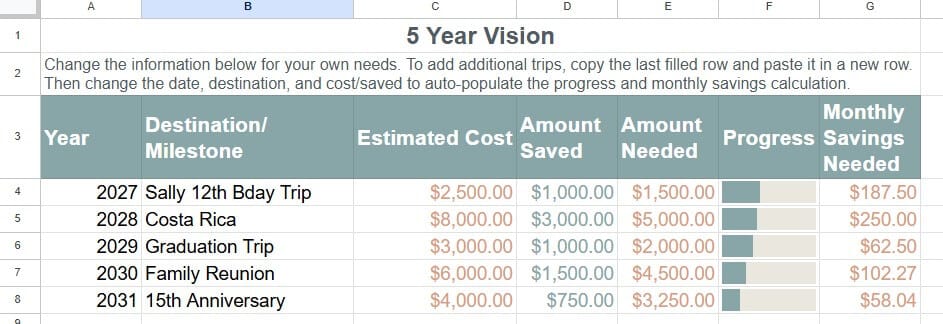
We want to take our kids on “milestone trips.” For us, that looks like big individual US-based trips around age 12 and major International trips when they are 16 or 17. If we don’t plan for those now, they will sneak up on us (and our bank account).
The 5-Year Vision tab allows you to make space for those “must-do” trips. You enter the destination and the year, and a rough estimate of how much it will cost. Add in how much you have currently saved, and the sheet calculates exactly what you need to save each month to get there.
Step 2: The 1-Year Travel Plan
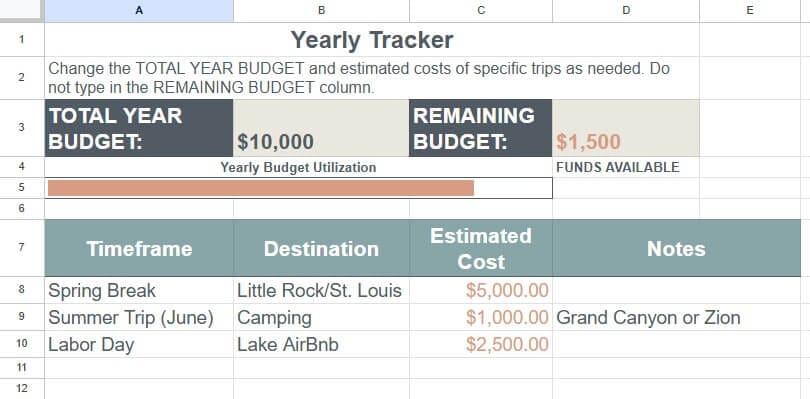
This tab is your “Big Picture” guardrail. It helps you see the whole year at once so you don’t accidentally run out of travel funds by July.
Even if you are a “last-minute” traveler who doesn’t have every destination picked out, you can still budget for a Fall Break trip or a weekend getaway. You don’t need a destination to set a financial boundary.
To use this tab, simply enter your total budget for the year and the estimated costs for each trip. Your remaining budget will adjust automatically.
Step 3: Trip-Specific Budgeting
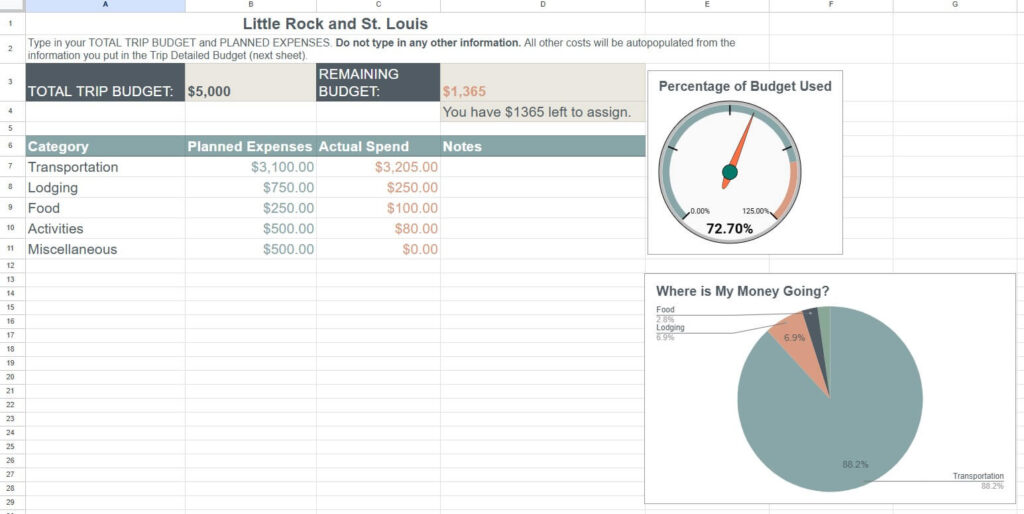
This is where we get into the nitty-gritty. For every specific trip, you’ll break down costs into these core categories: Food, Lodging, Transportation, Activities, and Miscellaneous. On this sheet, you will enter the total trip budget and your estimated costs for each category. The actual spend and remaining budget will autopopulate based on the information you input on the next sheet tab.
Food & Dining
Don’t just budget for dinners. Include snacks, groceries for the Airbnb, eating out, and those inevitable treats. To save money, I always suggest a quick grocery run on Day 1 for breakfast items and snacks.
Pro Tip: If you are staying somewhere with grocery delivery, you can also order your groceries on the way to your destination and have them ready soon after you arrive. We have Walmart+, so we get free delivery, and we save a lot by having food on hand, so we don’t overspend on junk at the gas station or hotel convenience store.
Lodging
Whether it’s a hotel, a vacation rental, or staying with family, estimate the total cost – including taxes and fees. You can also add in the amount for housekeeping tips here, or add them to your miscellaneous category. Make sure to research if there are additional fees not included in the price – resort fees, parking, etc., can sneak up on you.
Pro Tip: Look for lodging with a kitchenette. Even if you only cook two meals the entire trip, the savings on a family of five are significant. You will also want to weigh the cost of staying closer to popular attractions and paying more versus staying farther out and paying more for transportation.
Transportation
Include airfare, ride-shares, public transit, car rentals, tolls, and airport parking in your planned expenses.
Pro-Tip: If you can swing it (and I believe in you!) try to travel carry-on only! Not only does it make the airport easier, but you’ll save $60–$100 per person in checked bag fees.
Want help figuring out how to travel carry-on only? Check out CARRY-ON CONFIDENT and save big on baggage fees!
Activities
Make sure to include entrance fees, gear rentals, lessons, and tours (and tips for guides!).
Pro-Tip: If you are visiting National Parks and have a 4th grader, make sure to use the “Every Kid Outdoors” pass for free entry. AND if you are visiting any museums, check for ASTC reciprocity. You might already have a museum membership at home that will cover the entrance at other museums across the US and some international locations.
Miscellaneous
This is the sneaky stuff: Travel insurance, souvenirs, Visa fees, Passport renewals, international transaction fees, and tips.
Pro-Tip: Always build in a “Convenience Fund.” This is for the $20 you have to spend on an Uber because the kids are melting down and you can’t wait for the bus or the rewards ice cream after a long day.
Step 4: Tracking in Real-Time
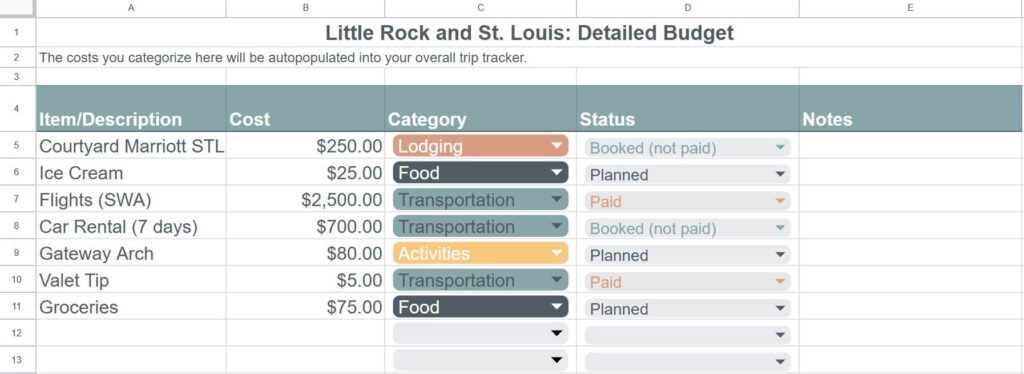
On the Trip Detailed Budget tab, you’ll enter your spending as you go. (Nerd alert: I actually find this part fun!)
Tracking during the trip prevents the post-trip panic. If you see you’re overspending on food by Day 3, you can adjust and make sandwiches in your hotel instead of going to Subway. Plus, having this data gives you a perfect baseline for planning your next trip!
Getting the Most Out of Your Tracker
If you’re a visual learner, I’ve put together a full YouTube walkthrough showing you exactly how I use this sheet to plan our family’s adventures:
Smart Travel Spending: Using the Template on a Trip
On a recent trip to Little Rock and St. Louis, I set a specific food budget before we left. That mattered because I already had other trips planned and did not want one vacation to eat into the money we needed for the next ones.
Since I had a set amount for food, I could enter each meal as we spent it and see exactly how much we had left. Partway through the trip, I could tell the budget was getting tight. Instead of just winging it, I checked what remained and worked backward to see what we could reasonably spend each day.
That gave me a chance to plan ahead, make better choices, and skip the extra treat I did not really need. It also taught me something helpful for future trips: as my family grows, our travel food budget needs to grow too. Now I can adjust future vacation budgets more realistically so we can eat well without adding stress.
That is exactly why I love using a travel budget template. It helps you learn from each trip and build a more realistic budget for the next one.
FAQ
Is this travel budget template free?
Yes! I believe every family should be able to plan meaningful trips without going into debt. You can download the Google Sheets template for free by clicking the link right here ➡ Get the template. I want you to spend your money on making memories, not on expensive software!
Does it work in Google Sheets and Excel?
This template is optimized for Google Sheets. I chose Google Sheets because it’s free, saves automatically, and most importantly, you can access the app on your phone while you’re standing in line at a theme park or sitting in a restaurant. While you can download it as an Excel file, some of the visual “utilization gauges” and progress bars work best within the Google ecosystem.
Can I use it as a vacation budget planner for one trip?
Absolutely. While the template includes a 5-Year Vision and a 1-Year Plan, you can jump straight to the trip-specific tabs. It’s perfect for a single weekend getaway to a National Park or a massive international adventure. Use as much or as little of the spreadsheet as you need!
When you are ready to plan your next trip, make a copy of the tracker and rename it for your next destination.
Does it help track actual travel expenses?
Yes, and that is actually my favorite part! There is a dedicated Trip Detailed Budget tab where you enter what you actually spend. The sheet will automatically compare your “Planned” vs. “Actual” costs so you can see exactly where your money went. This is the best way to get a realistic baseline for your next trip.
Is this template only for families?
While I designed this with a busy-mom mindset (meaning it’s simple and accounts for things like “kid meltdowns” and extra snacks), anyone can use it. Whether you are a solo traveler, a couple, or a group of friends, it works to fit your specific travel style.
Download the Free Travel Budget Template
Budgeting isn’t about saying “no” to travel. It’s about saying “yes” to the right travel. Use this template to create a baseline, be honest with your numbers, and watch how much more you enjoy your vacation when the financial stress is gone.
Happy (and smart) travels!